Starting a professional news and media setup requires careful planning and the right equipment. Whether you’re launching a new studio or upgrading your current setup, this checklist is designed to guide you through the essential components needed for a high-quality broadcast environment. Each section highlights key equipment categories, helping you prioritize your purchases based on your specific needs and budget.
Organized into clear categories, this guide provides detailed insights into each product type, including what features to look for and common pitfalls to avoid. Use this checklist as a step-by-step reference to ensure you select equipment that seamlessly integrates and enhances your media production capabilities. Remember, the goal is to create a professional, reliable, and engaging broadcast setup that impresses your audience.
Broadcast Microphones
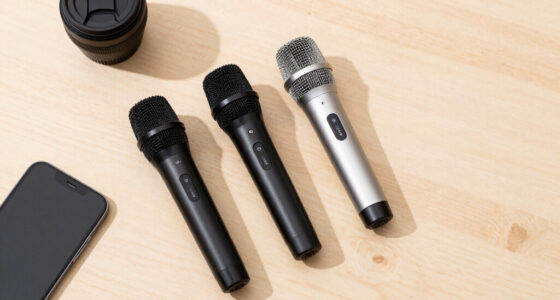
The broadcast microphone is the heart of your audio setup, capturing your voice with clarity and precision. The Electro-Voice RE20 Broadcast Announcer Microphone is a popular choice among professionals, known for its smooth, natural sound and durability. When selecting a microphone, consider factors like polar pattern, frequency response, and compatibility with your existing gear. Proper placement and quality cables are essential to avoid unwanted noise and ensure consistent sound quality. Many broadcasters also opt for bundles that include accessories such as shock mounts and pop filters, which can save time and money while improving overall audio quality.
One common mistake is choosing a microphone based solely on price, without considering the specific needs of your broadcast environment. For example, a cardioid pattern helps reduce background noise, making it ideal for noisy or echo-prone spaces. Make sure your microphone’s connectors and impedance match your audio interface or mixer, preventing compatibility issues. Investing in a quality microphone and proper accessories will pay off in professional-grade sound that keeps your audience engaged.
What to look for:
- Dynamic or condenser microphone based on environment
- Cardioid or hypercardioid polar pattern for noise rejection
- Compatibility with your audio interface or mixer
- Included accessories like shock mount and pop filter
- Durable build quality for long-term use
Electro-Voice RE20 Broadcast Announcer Microphone (Black) Bundle 309A Mic Shockm

The Electro-Voice RE20 is a durable broadcast microphone with a unidirectional polar pattern, designed for clear and focused audio capture. It features XLR connectivity and is compatible with radio and professional audio equipment, making it ideal for broadcasting and studio use.
Pros:
- Durable alloy steel construction ensures long-lasting use
- Unidirectional pattern provides focused sound capture
- Professional XLR connectivity for high-quality audio
Cons:
- Requires XLR-compatible equipment, which may need additional accessories
- Designed primarily for professional use, may be complex for beginners
Best for: Professional announcers and broadcasters
Not ideal for: Casual or low-budget setups
Bottom line: Choose a microphone that prioritizes clarity, durability, and compatibility.
Studio Lighting
Good studio lighting is crucial for creating a professional and visually appealing broadcast. The Godox SL60IID Softbox Lighting Kit provides versatile illumination with adjustable LED lights and softboxes that diffuse light evenly. Proper lighting enhances your appearance, reduces shadows, and helps convey your message more effectively. When selecting lighting, consider the size of your studio space, the flexibility of light positioning, and color temperature to match your desired mood or branding. Investing in a kit with multiple lights allows you to balance illumination and avoid harsh shadows, creating a polished look that engages viewers.
A common mistake is underestimating the importance of light placement or choosing lights that are too weak for your space. Make sure your lights are dimmable and can be adjusted for different scenarios. Compatibility with light stands, softboxes, and reflectors is also key. Consider the power source and energy efficiency of your lights, especially if you plan to broadcast for long hours. Proper setup and adjustment of your lighting will significantly improve the overall quality of your videos and make your content look professional and inviting.
What to look for:
- Adjustable brightness and color temperature
- Compatibility with softboxes and reflectors
- Dimmable LED lights for flexibility
- Light stands or mounting options
- Energy-efficient and reliable power sources
Godox SL60IID Softbox Lighting Kit with 3 LED Lights, Softboxes, Reflector, Stan

This professional studio lighting kit includes three Godox SL60IID LED lights with reflectors, multiple softboxes, stands, a boom arm, and various accessories, ideal for photography, video recording, live streaming, and more. The kit offers adjustable brightness, color temperature, and creative effects for versatile shooting scenarios.
Pros:
- Complete professional lighting kit suitable for various photography and video applications
- Adjustable brightness and color temperature with high color accuracy
- Wireless control via Bluetooth app for convenient operation
- Includes a variety of softboxes and accessories for creative flexibility
Cons:
- Heavy and bulky setup may require ample space
- No water resistance, limiting outdoor use in wet conditions
- Some users may find the complexity of multiple accessories overwhelming
Best for: Studio setups requiring even, soft lighting
Not ideal for: Small or casual streaming environments
Bottom line: Invest in versatile, adjustable lighting to elevate your visuals.
Audio Mixers
The audio mixer is the control center of your broadcast, allowing you to manage multiple audio sources seamlessly. The RØDE RØDECaster Pro II is an all-in-one solution designed specifically for podcasting and broadcasting, offering intuitive controls, multiple microphone inputs, and integrated sound pads. When choosing an audio mixer, consider the number of inputs needed, compatibility with your microphones and other audio gear, and features like sound effects, recording capabilities, and monitoring options. A good mixer simplifies complex audio setups and ensures your sound remains clear, balanced, and professional throughout your broadcast.
Many broadcasters make the mistake of underestimating the importance of audio monitoring or ignoring the need for redundant audio paths. Ensure your mixer has sufficient headphone outputs and volume controls, so you can monitor your audio in real time. Compatibility with your existing equipment, including microphones and speakers, is essential for smooth operation. Investing in a versatile, feature-rich mixer like the RØDE RØDECaster Pro II will streamline your workflow and help you produce high-quality content consistently, even under pressure.
What to look for:
- Multiple microphone and line inputs
- Built-in recording and sound effects
- Real-time monitoring and headphone outputs
- Compatibility with your existing gear
- Ease of use and intuitive controls
RØDE RØDECaster Pro II All-in-One Production Solution for Podcasting, Streaming,

The RØDECaster Pro II is a versatile all-in-one audio solution designed for podcasters, streamers, musicians, and content creators. It features studio-quality sound, customizable sound pads, multiple connectivity options, and advanced audio processing to enhance professional recordings and live streams.
Pros:
- Professional studio-quality audio with advanced processing features
- Highly customizable with multiple input/output options and sound pads
- Easy to use for various content creation needs
Cons:
- May be complex for beginners due to extensive features
- Premium price point might be high for casual users
Best for: Podcasters and live broadcasters
Not ideal for: Basic or minimal audio setups
Bottom line: Choose a mixer that offers flexibility and ease of use.
Video Cameras
The video camera sets the visual tone of your broadcast, making it essential to select a model that offers high quality and reliability. The Canon XF605 4K Camcorder combines professional-grade video with a 15x optical zoom, making it suitable for a variety of broadcast scenarios. When choosing a camera, focus on resolution, zoom capabilities, autofocus, and connectivity options. A bundle often includes accessories like batteries and memory cards, which are vital for uninterrupted shooting. A camera with flexible controls and manual settings will allow you to adapt quickly to different lighting and scene requirements, ensuring your content looks polished and professional.
Common mistakes include opting for cameras with insufficient zoom or poor low-light performance. Make sure your camera’s sensor size, lens quality, and compatibility with accessories match your production needs. Consider future-proofing by choosing models that support upgrades or additional lenses. Properly balancing your camera’s settings and using appropriate stabilization equipment will help you produce smooth, sharp footage that captivates your audience.
What to look for:
- 4K resolution and high-quality sensor
- Optical zoom of at least 15x
- Good low-light performance
- Flexible manual controls
- Compatibility with tripods and accessories
Canon XF605 4K Camcorder with 15x Optical Zoom (5076C002) Bundle
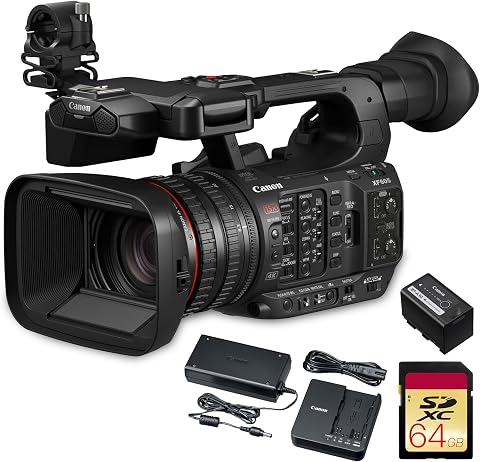
The Canon XF605 is a professional 4K HDR camcorder featuring a 1" CMOS sensor, 15x optical zoom, and advanced connectivity options like Wi-Fi and Ethernet. It is designed for broadcast, documentary, and event production, offering high-quality video recording with excellent low-light performance and versatile controls.
Pros:
- High-quality 4K HDR recording with excellent color and dynamic range
- Versatile and lightweight design suitable for on-location shoots
- Advanced connectivity options for live workflows and remote control
- Outstanding autofocus and low-light performance
Cons:
- Bundled accessories may be limited for some users
- Complex features might require a learning curve for beginners
Best for: Professional video production
Not ideal for: Casual or beginner-level setups
Bottom line: Pick a camera that balances quality, zoom, and ease of use.
Green Screen Backgrounds
Green screen backgrounds are a crucial tool for creating engaging, versatile visuals in your broadcasts. The Green Screen Backdrop Kit includes a T-shaped stand, clamps, and a carrying bag, making it easy to set up and transport. When choosing a green screen, consider the size, material (preferably wrinkle-free fabric or chroma key paint), and ease of setup. Proper lighting is essential to eliminate shadows and ensure a smooth chroma key effect, which allows you to replace backgrounds seamlessly in post-production or live. A well-chosen green screen can significantly enhance your branding or storytelling by providing a clean, professional backdrop that adapts to your content’s theme.
Many broadcasters make the mistake of not evenly lighting the green screen or using wrinkled fabric, which causes shadows and makes keying difficult. Use soft, diffuse lighting on the green screen and your subject, and ensure the backdrop is stretched tightly to avoid creases. Compatibility with your camera’s resolution and aspect ratio is also important to achieve a crisp, clean key. With the right setup, a green screen opens up endless creative possibilities to elevate your production value and keep your content visually compelling.
What to look for:
- Large, wrinkle-free fabric or chroma key material
- Stable, adjustable stand
- Even lighting setup
- Compatibility with camera resolution
- Easy to transport and store
Green Screen Backdrop Kit with T-Shaped Stand, Clamps & Carrying Bag, 6.5 x 5 Fe

This portable green screen kit includes a 6.5 x 5 feet cotton backdrop and an adjustable T-shaped steel stand, ideal for photography, streaming, and video production. The setup is easy to assemble, lightweight, and comes with a carrying bag for on-the-go use.
Pros:
- Sturdy and adjustable T-shaped stand for versatile height settings
- High-quality, wrinkle-resistant green screen fabric
- Portable and lightweight with a carrying bag for easy transport
- Suitable for various applications like streaming, photography, and virtual events
Cons:
- Fabric may crease during shipping and require ironing
- Limited to indoor use due to fabric material
- Customer reviews indicate moderate durability
Best for: Dynamic video productions
Not ideal for: Limited space or budget constraints
Bottom line: Choose a green screen kit that offers size, stability, and easy setup.
Editing Software
The right editing software transforms raw footage into professional-quality videos. Adobe Premiere Pro stands out as a versatile, feature-rich option suitable for a wide range of broadcast productions. It offers powerful tools for cutting, color grading, effects, and audio editing, making it a comprehensive solution for content creators. When selecting editing software, consider compatibility with your operating system, your familiarity with editing workflows, and the specific features you need, such as multi-camera editing or motion graphics. A 12-month subscription provides access to regular updates and support, ensuring your software stays current with industry standards. Learning the basics of editing and organizing your media efficiently can save you time and improve your final product.
Many beginners make the mistake of choosing overly complex or underpowered software that hampers productivity. Focus on user-friendly interfaces, robust tools, and good support communities. Compatibility with your hardware, plugins, and export formats is also critical. Investing in reliable editing software will help you produce polished, engaging videos that resonate with your audience, whether for live news, interviews, or feature segments. Remember, the software is just a tool—practice and creativity are what truly elevate your content.
What to look for:
- User-friendly interface
- Comprehensive editing and effects tools
- Support for multiple formats and resolutions
- Compatibility with your hardware
- Regular updates and support
Adobe Premiere Pro Video Editing and Production Software – 12-Month Subscription
Adobe Premiere Pro is a professional video editing software used for film, TV, and web content creation. It offers advanced tools powered by AI for editing, color correction, audio refinement, and effects, suitable for creators from Hollywood filmmakers to YouTubers.
Pros:
- Powerful AI-driven editing tools that simplify complex tasks
- Supports a wide range of formats including 8K and virtual reality
- Seamless integration with other Adobe apps like After Effects
Cons:
- Requires a subscription, which can be costly over time
- Steep learning curve for beginners
- Performance depends on high-end hardware
Best for: Content creators and broadcasters
Not ideal for: Basic or free editing tools
Bottom line: Choose editing software that balances features, ease of use, and future updates.
When building your news and media station, it’s wise to start with the essentials that fit your budget and goals. Prioritize equipment that offers the best value and scalability, allowing you to grow without constantly replacing gear. Remember, quality components like microphones, lighting, and cameras significantly impact your production’s overall professionalism and audience engagement.
Don’t forget to take your time researching each product, and consider your specific needs for space, content, and technical skill. A well-chosen setup will not only improve your broadcast quality but also boost your confidence as a content creator. Happy broadcasting, and best of luck with your new media station!